Control a Ragdoll Together Co-op Communication Tips
Callouts, timing counts, and blame recovery when Voice Chat is unavailable.
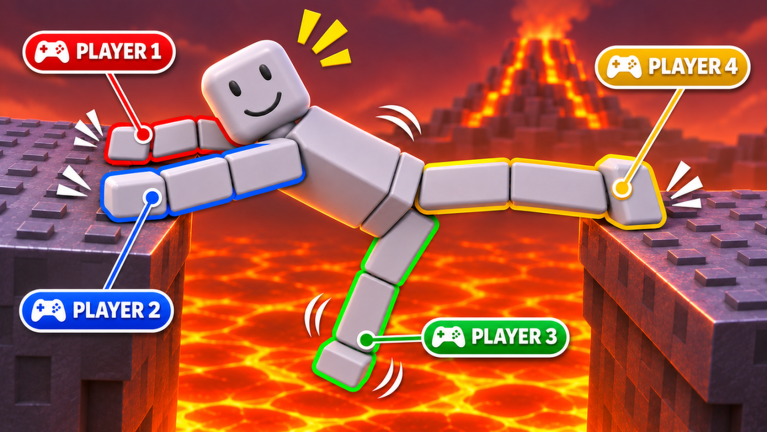
Shared-puppet co-op lives or dies on communication. Control a Ragdoll Together! supports online 1–4 players on one body, but the Roblox listing marks Voice Chat as not supported. That single detail shapes every good stack: you need crisp text callouts, external voice, or rehearsed silent counts. This guide covers how to talk, when to move, how to recover after the blame UI, and how to keep friendships intact through Ember Core attempts.
Pair these habits with precise inputs from the controls guide and seating ideas from the players hub.
Pick a communication channel before play
Ranked options for most groups:
- External voice (Discord, console party, phone call) — best latency for hammer windows.
- Roblox text chat with a designated caller — works if everyone watches chat and the caller types short phrases.
- Pre-agreed silent counts — clap, stick wiggle, or “ready check” emotes, then a memorized 3-2-1 in each player’s head.
Decide the channel in the lobby. Switching mid-obby causes the exact desync that spikes create.
Callout language that fits chat boxes
Long sentences fail. Use a tiny vocabulary:
- Ready — limb neutral, camera on hazard
- Hold — nobody moves
- Go or 3-2-1 — initiate the planned inputs
- Arms / Legs — who acts on this beat
- Checkpoint — stop and reset composure
- Blame OK — acknowledge the overlay without debate
- Swap — change seats at a safe checkpoint only
Example hammer clear: “Hold. Legs go on three. 3-2-1 go.” Arms stay quiet unless a grab save was planned.
Timing culture
Good timing is a social contract:
- The caller watches the hazard cycle and owns the count.
- Followers do not freestyle a second earlier “because it looked free.”
- If someone misses the count, freeze and reset—do not cascade panic inputs.
- After two failed counts, re-explain the plan in one sentence, then try again.
Monkey bars need release sync; spikes need cadence; meteors need strafe direction called early (“left left”). Details per hazard sit in the obstacle guide.
Whose-fault recovery loop
The blame system will point at someone. Healthy teams run a four-beat recovery:
- Read the highlighted limb without stacking jokes for ten seconds.
- Name the mis-input (“right arm early release”).
- Fix with one adjustment (“release on go, not on wind-up”).
- Ready from the checkpoint with a fresh count.
Unhealthy teams open a trial, drag old mistakes into chat, and lose the next easy jump. Remember: the overlay exists so you spend less time guessing—not more time flaming. If you are the flagged player, own it fast; that shortens the emotional half-life of the wipe.
Voice alternatives when Roblox VC is off
Because in-experience Voice Chat is unavailable:
- Create a small Discord stage just for ragdoll nights.
- Console friends should invite the whole stack to platform party chat before pressing play on Roblox.
- Mobile players can use earbuds on a phone call while watching the thumbstick.
- Pure text stacks should enlarge chat and keep the caller on PC for faster typing.
Never share passwords or account cookies in those voice channels. Scam links love co-op Discords—see also the caution tone on the scripts hub.
Roles beyond limbs: social jobs
Even in a duo, assign soft jobs:
- Caller — owns counts
- Spotter — watches meteor shadows or hammer loops and pings direction
- Morale — forces checkpoint breaks before tilt
- Host — maintains the Roblox server invite and seating chart (players)
In a full four, do not let everyone call. Multiple overlapping counts are worse than silence.
Party-size specific tips
Solo: Talk to yourself with on-screen notes or a second-monitor checklist from the worlds walkthrough.
Duo: Highest clarity—use voice if possible; seat the better climber on arms.
Trio: Explicitly name who is silent on each beat so the third input does not sneak in.
Four: Require ready checks; mute side banter during S-tier rooms near Ember Core.
Tier context for sizes lives on the tier list hub.
Tilt management
Ragdoll comedy becomes toxic when egos outrun jokes. Hard rules:
- Two wipes in a row → mandatory 20-second hold at checkpoint.
- Personal insults → pause the run; the puppet is not worth a friend loss.
- If one player is lagging, swap them to a less timing-critical limb instead of mocking them.
- End on a successful Plains warm-up if Ember Core attempts go sideways—leave wanting another session.
Pre-flight co-op checklist
- Channel chosen (voice or text)
- Caller named
- Limbs announced
- First hazard plan stated in under ten words
- Codes FOMO ignored (codes hub still empty of verified promos)
- Everyone opened from the official game page
Co-op skill is mostly manners plus metronomes. Nail both and the blame UI becomes a coach instead of a villain.
Frequently Asked Questions
Quick answers to the most common questions.
Why can’t we use Roblox Voice Chat in this game?
The experience lists Voice Chat as not supported. Use Discord, console party chat, phone voice, or tight text callouts instead.
Who should be the caller?
Pick the calmest player with the best view of hazard cycles—often on PC with fast typing or on external voice. Only one caller per attempt.
How do we handle the blame system without arguing?
Read the limb, name the mis-input, state one fix, then ready up. Save jokes for after the checkpoint hold.
What callouts matter most?
Ready, Hold, counted Go, limb names, Checkpoint, and brief direction calls like left/right for meteors.
Should four players all talk?
No. One caller, optional spotter. Extra voices during hammer wind-ups cause early inputs and fresh blame popups.